REDCap
What is REDCap?
REDCap (Research Electronic Data Capture) is a secure browser-based tool for building and managing surveys and databases. It is widely used in medical research but is also suitable for processing more sensitive data in human sciences.
REDCap is installed on the University’s own server, which means that the University retains control of the collected data. The data is backed up several times per day and the backups are retained for 60 days.
Benefits and functionalities of the REDCap system
- Creates online surveys and databases quickly and securely.
- Creates and designs projects by using a web browser.
- Fast and flexible.
- Data can be exported in Microsoft Excel, PDF, SAS, Stata, R or SPSS files for analysis.
- Enables the creation of reports based on customised surveys.
- Supports scheduled surveys. A built-in project calendar can be used.
- Enables communication with research subjects and contact information management.
- An electronic questionnaire can be easily converted to PDF for paper-based data collection.
- Data can be imported from external data sources.
- REDCap also records an audit trail, i.e. the system collects log data on the viewing and editing operations performed by users on the project data. This information can also be used to validate data collection and management later if necessary. Only people to whom the project owner has granted the necessary access rights can view the project’s logging page.
The REDCap system is developed by Vanderbilt University. Its use is free, but the programme can only be used for educational and non-commercial research purposes.
How to get started
You can log in to the REDCap system with your TUNI account on: https://redcap.tuni.fi.
The project creator manages his or her own project. He or she can grant user permissions to the other users in the project.
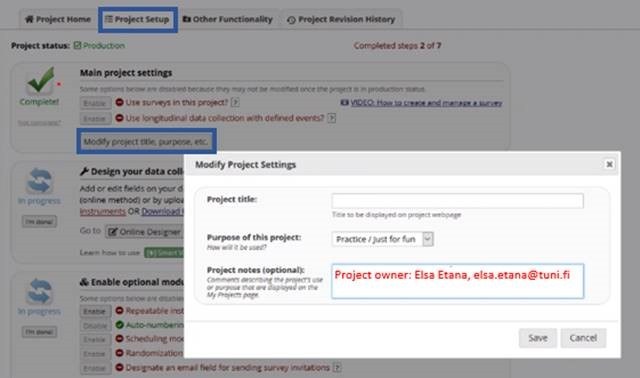
PLEASE NOTE! Each REDCap project must have an administrative owner who is responsible for the project data collected and maintained in REDCap system. Project owner must be a TUNI staff member (or have TUNI user rights equivalent to those of staff). The project owner's name and TUNI email address must be added to the project on Project Setup tab.
- Main project settings -> Modify project title, purpose, etc. -> Project notes (optional)
For users who are not employees, a basic resource agreement is sufficient to use REDCap.
The person responsible for the study and the REDCap project must comply with the data protection principles of research and ensure that the required data protection notices have been properly prepared. Learn more about data protection in research on the intranet.
Instructions
More detailed English-language instructions and training videos can be found on REDCap's website.
A link to the Finnish-language training videos (logging with TUNI account)
IT Helpdesk
+358 294 520 500
it-helpdesk [at] tuni.fi
helpdesk.tuni.fi