Digital tools for teaching - onion model
Digital tools for teaching
Digital tools for teaching have been compiled on the interactive onion model, which illustrates available tools and their role at Tampere Universities. From the model, you can find more detailed information about the tools, links to instructions, and help in choosing the right tool according to your use case.
From the link below, you can find the interactive onion model. Press the red info icons in model to find a description and instructions of the tool or category.
Digital Tools for Teaching and learning
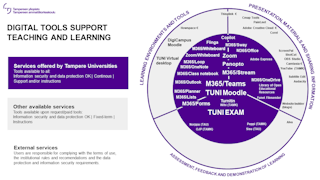
Inner circle: Primarily select one of these tools because they are available to you free of charge and meet the data protection and information security requirements. These tools also have a long lifespan and will not be discontinued abruptly.
Outer circle: These tools are also checked for security and data protection issues, but the use and duration of use depends on the terms and conditions of each service and the contract. Support for using the tool may also not be available. Check the software catalogue to see if the tool in question is
- free of charge and free for all to use, but you have to download it to your computer from the Software centre
- software available for a fee or on a separate request or for a limited time: follow the instructions in the software catalogue or contact the IT Helpdesk.
Other tools: Discipline-specific tools that are not available to the wider community are not listed in the model, but you can find them in the software catalogue or by contacting IT helpdesk. Agree on the need to use paid digital tools in advance with your supervisor, as the cost of the license subscription will be charged to your school/faculty.
External services: Before you use any external services and tools (such as social media), you must always read the terms of use. Usage always requires familiarization with the terms of service and responsibility for complying with data security and privacy rules lies with the user. Read instructions on Information security and data protection in teaching.
Software purchase: If you need a new software, you can inquire about the possibility of purchasing this software by contacting the IT Helpdesk. Before deciding to purchase new software, IT staff will look into data protection and information security questions and the license terms. The review process may take time, and the procurement may incur additional costs or be prevented, for example, due to security concerns. Read the instructions on how to get a new software.
Tips for using digital tools in teaching
The Digital Toolkit is a practical resource that offers you information and advice for using a variety of digital tools for teaching, learning and work-related purposes.
IT Helpdesk
0294 520 500
it-helpdesk [at] tuni.fi (it-helpdesk[at]tuni[dot]fi)
helpdesk.tuni.fi